If you’ve been scrolling through social media lately, there’s a good chance you’ve seen people sharing colorful festival-style posters featuring their favorite artists. That’s the work of the Instafest app, a surprisingly simple but wildly addictive tool that turns your music taste into a fictional music festival lineup. This Instafest App Guide will walk you through everything—from what it is and how it works to customization tricks, privacy concerns, and even whether it’s worth using long-term.
Let’s dive in properly and break it all down in a way that actually makes sense without overcomplicating things.
What Is Instafest and Why Did It Go Viral?
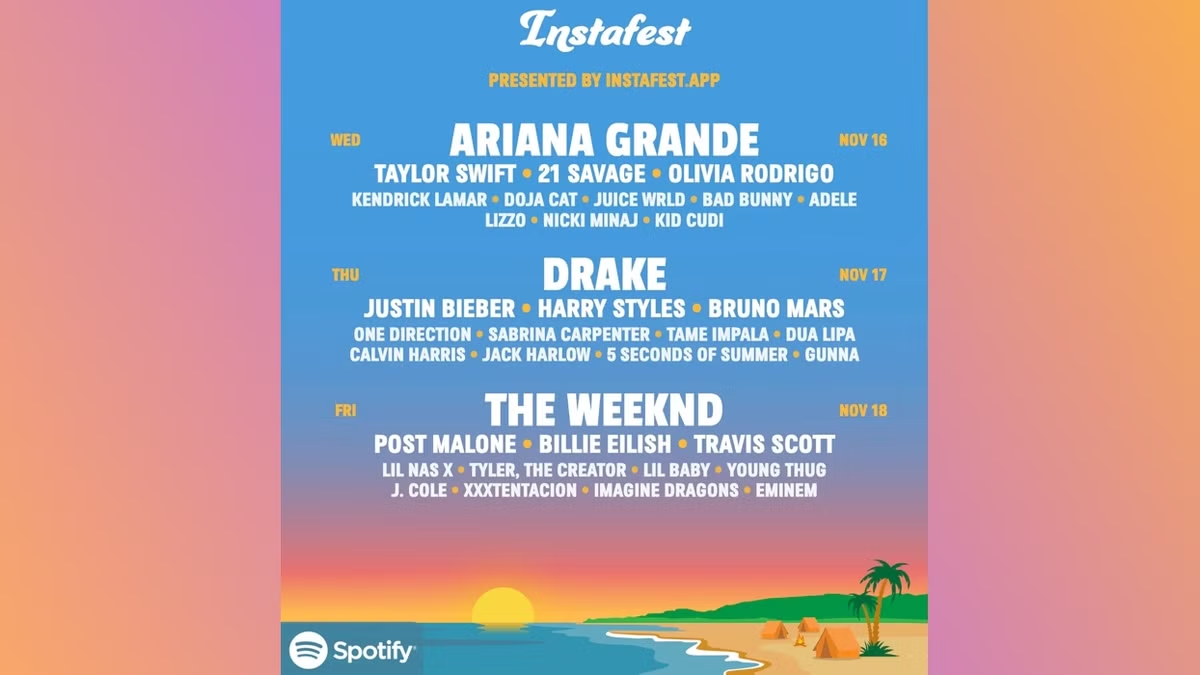
At its core, Instafest App Guide is a web-based app that generates a fake music festival lineup based on your listening history. It connects to your music streaming account—usually Spotify—and pulls your most-played artists to build a personalized festival poster. The result? A visually appealing lineup that looks like something between Coachella and Lollapalooza, but starring your own music taste.
The app is officially known as Instafest, and it became viral almost overnight because it taps into something very simple: people love seeing themselves reflected in creative ways. Instead of just sharing “my top songs,” Instafest gives users a full aesthetic poster they can post on Instagram, X, or TikTok.
What makes it even more interesting is how quickly it spreads. Once one person shares their festival lineup, others feel curious and try it themselves. This chain reaction turned Instafest into a social media trend rather than just another music tool.
Another big reason for its popularity is nostalgia. Festival posters have a cultural appeal—they remind people of real-life music festivals. Instafest takes that emotional connection and personalizes it, which is exactly why people engage with it so heavily.
How Instafest Actually Works Behind the Scenes
Even though Instafest App Guide looks complex, the actual process is surprisingly simple. The app connects to your Spotify account and reads your listening history using Spotify’s API. It then ranks your most-streamed artists over different time periods and uses that data to generate a festival lineup.
When you first log in, Instafest usually asks for permission to access your Spotify data. This includes your top artists, listening habits, and sometimes short-term and long-term listening trends. Once access is granted, the app processes that information and builds a lineup that feels personalized.
The interesting part is how it organizes your artists into “festival tiers.” Your most-played artists typically appear as headliners, while less frequently played artists show up in smaller text on the lineup. This creates a realistic festival structure, even though it’s entirely algorithm-based.
Finally, the app overlays everything onto a festival-style poster background. You can usually choose different visual themes, which we’ll discuss later. The end result is something that looks like a real event lineup but is actually just a reflection of your streaming behavior.
Step-by-Step Guide to Using Instafest Like a Pro
Using Instafest App Guide is straightforward, but there are still a few things worth knowing if you want the best results. First, you need a Spotify account because Instafest relies heavily on Spotify data. Without it, the app cannot generate your festival lineup.
Once you visit the Instafest website, you simply log in using your Spotify credentials. After granting permission, the app will immediately start analyzing your listening history. Within seconds, your personalized festival poster appears on the screen.
At this point, you can start customizing your experience. Instafest allows you to choose between different time ranges like “last 4 weeks,” “last 6 months,” or “all time.” This is important because your lineup can change dramatically depending on the timeframe you select.
After choosing your timeframe, you can also select a festival name. This is where creativity comes in—you can either use your own name or let the app generate something fun. Once everything looks good, you can download the image or share it directly on social media.
The entire process usually takes less than two minutes, which is one of the reasons people love it so much. It’s quick, fun, and gives instant gratification without any learning curve.
Customization Features That Make Instafest Fun
One of the biggest strengths of Instafest is how much control it gives users over the final design. While the core concept stays the same, the customization options allow you to make each festival poster feel unique.
First, you can choose different background themes. These often include options like desert landscapes, city skylines, or beach vibes. Each theme completely changes the mood of your festival poster, even if your music data stays the same.
Second, you can adjust how your lineup is displayed. Instafest App Guide typically offers different sorting options based on popularity or listening frequency. This can dramatically change which artists appear as headliners versus supporting acts.
Another fun feature is the ability to rename your festival. This might seem small, but it actually adds a lot of personality to your poster. Some people use their own names, while others create fictional festival names that match their aesthetic.
Overall, customization is what keeps Instafest from feeling repetitive. Even if you generate multiple posters, they can all look different depending on the settings you choose.
Privacy and Data Concerns You Should Know About
Whenever an app connects to your streaming account, privacy naturally becomes a concern. Instafest is no exception. Since it accesses your Spotify data, users often wonder what exactly is being collected and how it is used.
The good news is that Instafest only accesses your listening data. It does not collect personal messages, payment information, or unrelated account details. Its main purpose is simply to analyze your top artists and listening habits.
However, like any third-party tool, it’s important to understand permissions. When you connect Spotify to Instafest, you are temporarily granting access to your music data. While this is standard for apps like this, you should always review permissions carefully before proceeding.
Another important point is that Instafest does not require permanent access. You can revoke its permissions through your Spotify account settings at any time. This gives users full control over their data.
In general, Instafest is considered safe by most users, but it’s always wise to be cautious when linking accounts to external services.
Why Instafest Became a Social Media Trend
The success of Instafest App Guide isn’t just about functionality—it’s about psychology and social behavior. People enjoy sharing things that feel personal, but also visually appealing. Instafest hits both of these points perfectly.
Unlike simple text-based stats like “your top artists,” Instafest transforms data into something visual and aesthetic. This makes it much more shareable on platforms like Instagram and TikTok, where visuals matter more than text.
Another reason it went viral is comparison culture. When users see their friends’ festival lineups, they naturally want to create their own. This creates a loop of engagement that fuels the app’s popularity.
It also helps that music taste is a strong identity marker. People often feel emotionally connected to their favorite artists, so seeing them grouped into a festival lineup feels personal and exciting.
In short, Instafest succeeded because it turned boring data into something expressive and social-media friendly.
Common Issues and How to Fix Them
Even though Instafest App Guide is simple, users occasionally run into minor issues. One of the most common problems is Spotify connection errors. This usually happens when permissions are not properly granted or when the browser blocks pop-ups.
To fix this, you can try logging out and reconnecting your Spotify account. Clearing browser cookies can also help reset the connection process.
Another issue users sometimes face is missing or incomplete data. If your festival lineup looks empty or inaccurate, it may be because your listening history is too limited in the selected timeframe. Switching to “all time” usually resolves this.
Some users also report that the app loads slowly during peak times. This is typically due to high traffic rather than a technical problem on your end. Waiting a few minutes and refreshing the page usually solves it.
Overall, most issues with Instafest are minor and easy to fix without technical knowledge.
Tips to Get the Best Instafest Results
If you want your Instafest App Guide poster to look more interesting, there are a few simple tricks you can use. First, experiment with different time ranges. Each range gives you a slightly different view of your music taste, and sometimes older data creates more diverse lineups.
Second, don’t hesitate to refresh and regenerate. Small changes in data processing can produce noticeably different results, even if you don’t change settings.
Another useful tip is to explore your Spotify listening habits beforehand. If you’ve recently been looping a few artists heavily, your festival lineup may become less diverse. Listening to a wider range of music before generating your poster can make the result more visually interesting.
Finally, try different festival names and themes. These small creative touches can make your poster stand out more when shared on social media.
Alternatives to Instafest You Might Also Like
While Instafest App Guide is one of the most popular tools in this category, it’s not the only one. Several other apps offer similar music visualization experiences.
For example, Spotify Wrapped is an official yearly feature that summarizes your listening habits in a polished format. While it’s not as customizable as Instafest, it is more detailed and data-rich.
There are also other third-party tools that generate music visuals, including apps that create mood boards, sound wave art, or listening personality breakdowns. However, none of them quite match the viral aesthetic appeal of Instafest.
What sets Instafest apart is its simplicity. It doesn’t try to do too much—it just takes your music taste and turns it into something visually fun and shareable.
Conclusion:
After exploring this complete Instafest App Guide, it’s clear that Instafest is less about functionality and more about experience. It doesn’t change how you listen to music, but it does change how you see your listening habits.
It’s quick, fun, and visually engaging, which is exactly why it became viral. Whether you’re deeply into music analytics or just want something cool to post on social media, Instafest delivers on its promise.
At the same time, it’s important to remember that it’s a lightweight tool. It’s not meant for deep music analysis or long-term use. Instead, it shines as a creative snapshot of your listening personality at a specific moment in time.